Choosing a messaging platform isn’t just about finding the cheapest option.
It’s about understanding what you’re paying for, how costs change as you grow, and whether the platform supports the channels your customers actually respond to.
In this post, we compare Go-Mailer and Mailchimp — looking beyond surface-level pricing to help you decide which solution fits your business needs.
Who Each Platform Is Built For
Mailchimp is best known as an email marketing platform for small businesses and creators who are just getting started. It focuses heavily on email campaigns, templates, and basic automation.
Go-Mailer, on the other hand, is built for businesses that want to communicate across email, SMS, and push notifications from one system. It’s designed for brands that care about lifecycle messaging, automation, and consistent customer experiences across channels.
Neither approach is “better” by default — the right choice depends on your goals.
Pricing Approach: What You’re Really Paying For
Mailchimp typically starts with lower entry-level pricing, which makes it attractive for early-stage businesses. However, as your contact list grows, pricing increases quickly, especially when you need advanced automation, segmentation, or analytics.
It’s also important to note that:
- SMS and push notifications are not fully native and often require third-party tools
- Costs can increase as you stack integrations to achieve multi-channel messaging
Go-Mailer uses a different pricing philosophy:
- Pricing is structured around multi-channel usage, not just email volume
- Email, SMS, and push are designed to work together in one system
- Businesses often avoid paying for multiple tools as they scale
The difference isn’t just price — it’s cost structure.
Features Breakdown: What You Get at Each Level
Automation & Journeys
- Mailchimp offers automation flows, but they are mostly linear and email-focused.
- Go-Mailer supports multi-channel journeys where actions in one channel can influence messaging in another.
Segmentation
- Mailchimp relies heavily on list-based segmentation.
- Go-Mailer emphasizes behaviour-based segmentation, allowing brands to message users based on real actions, not just tags.
Multi-Channel Messaging
- Mailchimp excels at email.
- Go-Mailer is built for email, SMS, and push working together, not as add-ons.
Scalability
- Mailchimp works well for small lists but can become expensive as complexity increases.
- Go-Mailer is designed for growing teams that want predictable costs and centralized messaging.
Pros & Cons
Mailchimp Pros
- Easy to get started
- Large template library
- Familiar interface
Mailchimp Cons
- Costs increase quickly as lists grow
- Limited native SMS and push capabilities
- Automation depth is restricted at lower tiers
Go-Mailer Pros
- Easier to get started
- More affordable
- True multi-channel messaging (email, SMS, push)
- Strong automation and journey-building
- Better suited for lifecycle and retention strategies
Go-Mailer Cons
- No predefined templates
Pricing Comparison at Scale
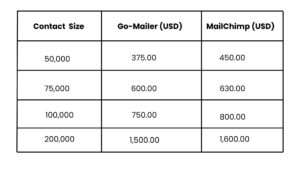
Which Platform Should You Choose?
Choose Mailchimp if:
- You’re focused only on email
- You’re running simple, one-off campaigns
- You don’t need multi-channel messaging or advanced automation
Choose Go-Mailer if:
- You want email, SMS, and push in one platform
- You’re building customer journeys, not just sending campaigns
- You want automation that scales without adding more tools
- You care about retention, engagement, and long-term revenue
Price alone doesn’t tell the full story.
The real question is whether your platform supports how your customers want to be communicated with — today and as you grow.If you’re comparing platforms, focus on value, scalability, and channel alignment, not just the monthly fee. Want to see how Go-Mailer pricing works for your audience size and messaging needs?
Talk to our team